
NetSuite triggers
NetSuite component triggers.
Get New and Updated Objects Polling
This versatile trigger monitors a NetSuite instance for new or modified objects across all supported types.
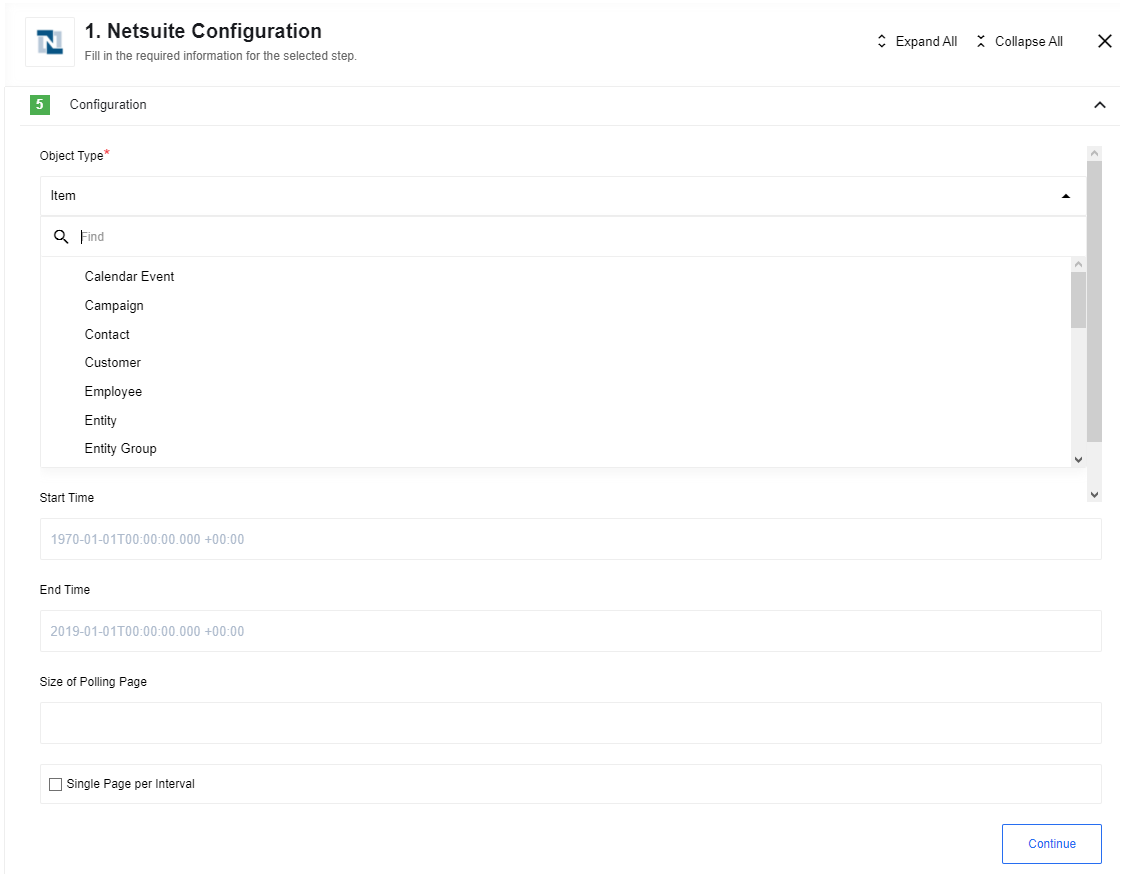
On the initial execution, the trigger retrieves all existing objects of the selected type. It maintains a snapshot of the last processing time to ensure subsequent runs only capture records added or updated since the previous check.
Configuration Fields
- Object Type (dropdown, required): The NetSuite object type to monitor.
- Start Time (string, optional): The timestamp from which to begin polling. If omitted, the trigger processes records from the beginning of time.
- End Time (string, optional): If specified, the trigger will ignore records modified after this timestamp.
- Size of Polling Page (number, optional): Defines the number of records retrieved per page. Defaults to
1000. Valid values are0(defaults to 1000) or any integer5or greater. Values between1and4are not supported. - Single Page per Interval (boolean, optional, default: yes): When enabled, if the volume of changes exceeds the page size, the trigger will process only the first page and wait for the next scheduled execution to retrieve subsequent data.